
There is no official Google Trends MCP server. Google publishes neither an MCP nor a public Trends API, so every option you can install today is either a third party wrapping Google Trends, Google's own BigQuery MCP pointed at a public dataset, or a different trends database entirely. We checked eight of them on November 26, 2026, each on its own repo, docs or pricing page, and the choice comes down to one question nobody on page one answers: does the server hand your assistant a 0-100 relative index, or a real number of searches.
Key takeaways:
- Google ships no Google Trends MCP. The official Trends API is still an alpha you apply for, as of November 26, 2026.
- The only official Google route is BigQuery. The BigQuery MCP server queries the
bigquery-public-data.google_trendsdataset, free inside BigQuery's 1 TB monthly tier, but it only holds the top 25 and top 25 rising terms per day. - Most servers return the 0-100 index, which cannot tell you whether a spike is 740 searches or 74,000. Rising Trends MCP answers in absolute US monthly search volume instead.
- Prices differ by 25x. A thousand Google Trends calls costs $25 on SerpApi's entry plan, about $9 on DataForSEO, about $3 on HasData and nothing on a pytrends server, if Google does not throttle you.
- Demand moved to the connector, not the protocol. "mcp connectors" is up 817% in a year and "claude mcp" up 179%, while "mcps" is down 18%, at 135,000 US searches a month (Rising Trends, October 2026).
Let's get into it.
Is there an official Google Trends MCP server?
No. Google has not released one, and the underlying data has no public API either. The Google Trends API page on Search Central still reads "Get early access to the Google Trends API alpha" and is still accepting applications for alpha testers.
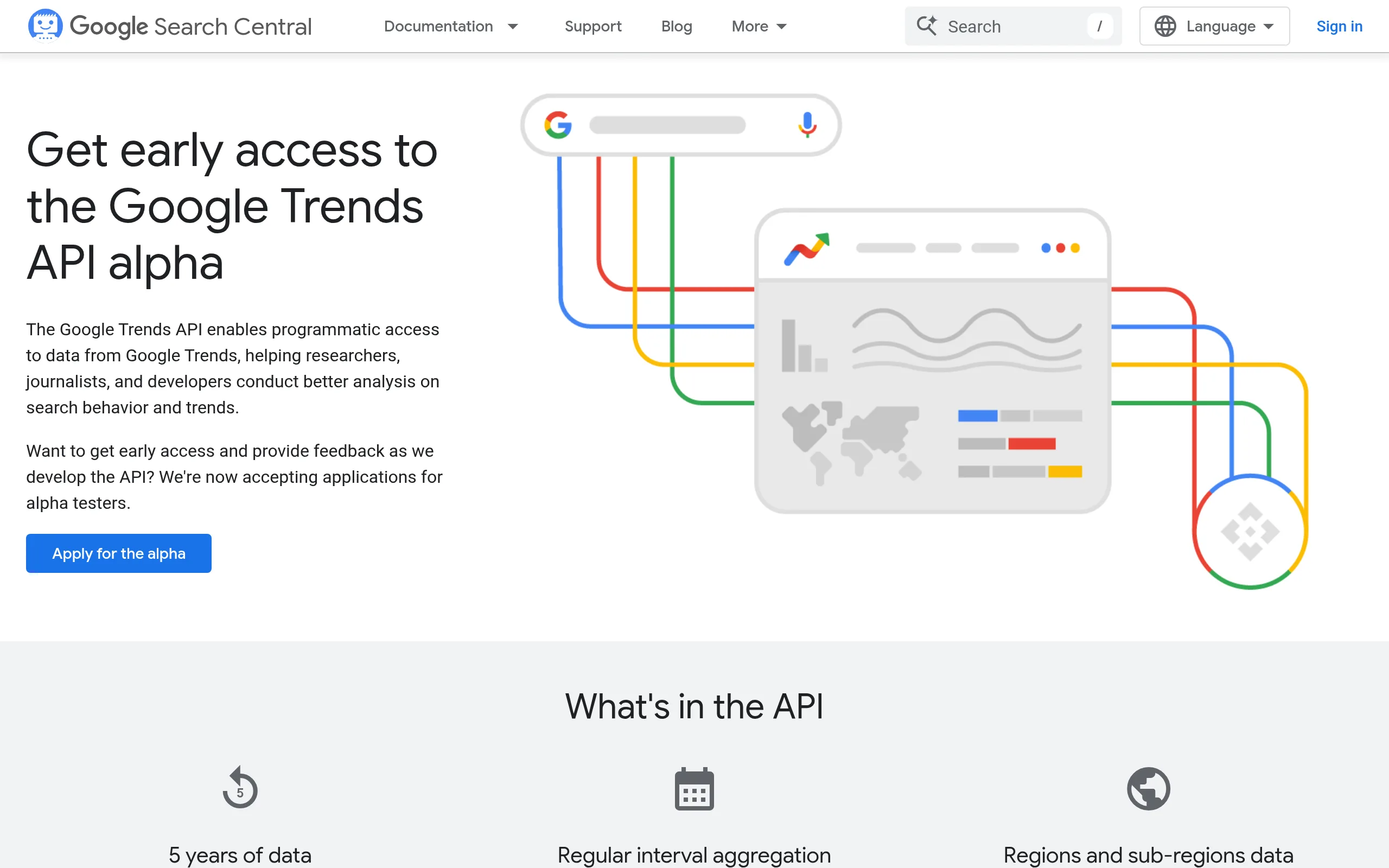
That alpha is worth knowing about even though you probably cannot use it yet. Google's announcement of the API describes a rolling five year window, daily, weekly, monthly and yearly aggregation, region and sub-region breakdowns, and scaling that stays consistent between requests instead of being rescaled to 0-100 each time. That last part is the real upgrade, because it means you can compare dozens of terms in one analysis. It is still search interest, not a count of searches, and access is limited to a small group of testers.
So when a vendor advertises a "Google Trends MCP", it is one of three things: a hosted scraper with a paid API key, a local server built on the unofficial pytrends library, or a server for a completely different dataset. The rest of this page sorts them.
Why people are asking for this now
We track the search demand ourselves, and the shape is clear. "mcp server" went from almost nothing to 74,000 US searches a month in two years.
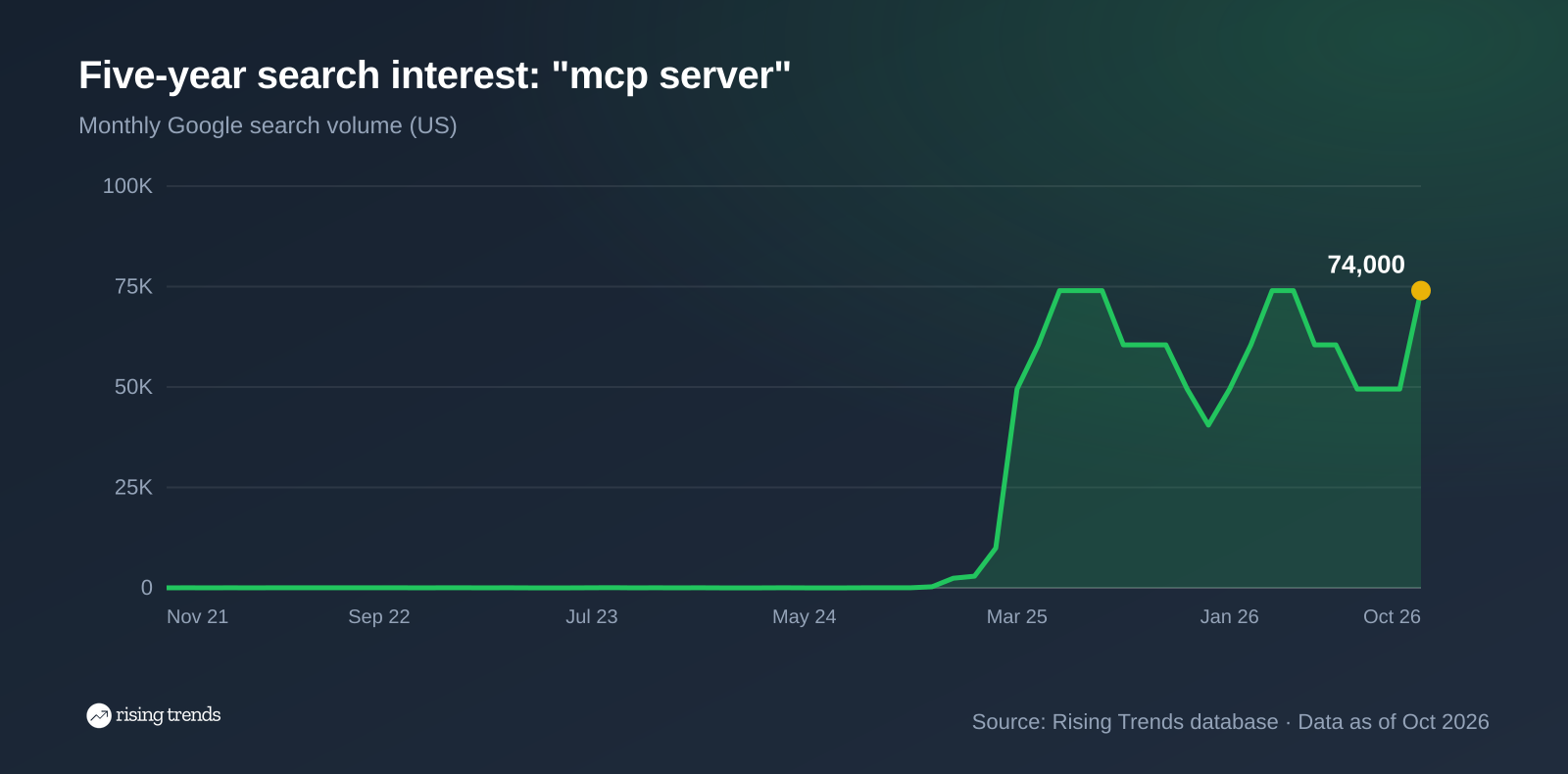
The curve plateaus in mid 2025 and sits there. Interest in the protocol itself has stopped compounding. What is still compounding is everything one layer up, where people connect a URL rather than run a server.
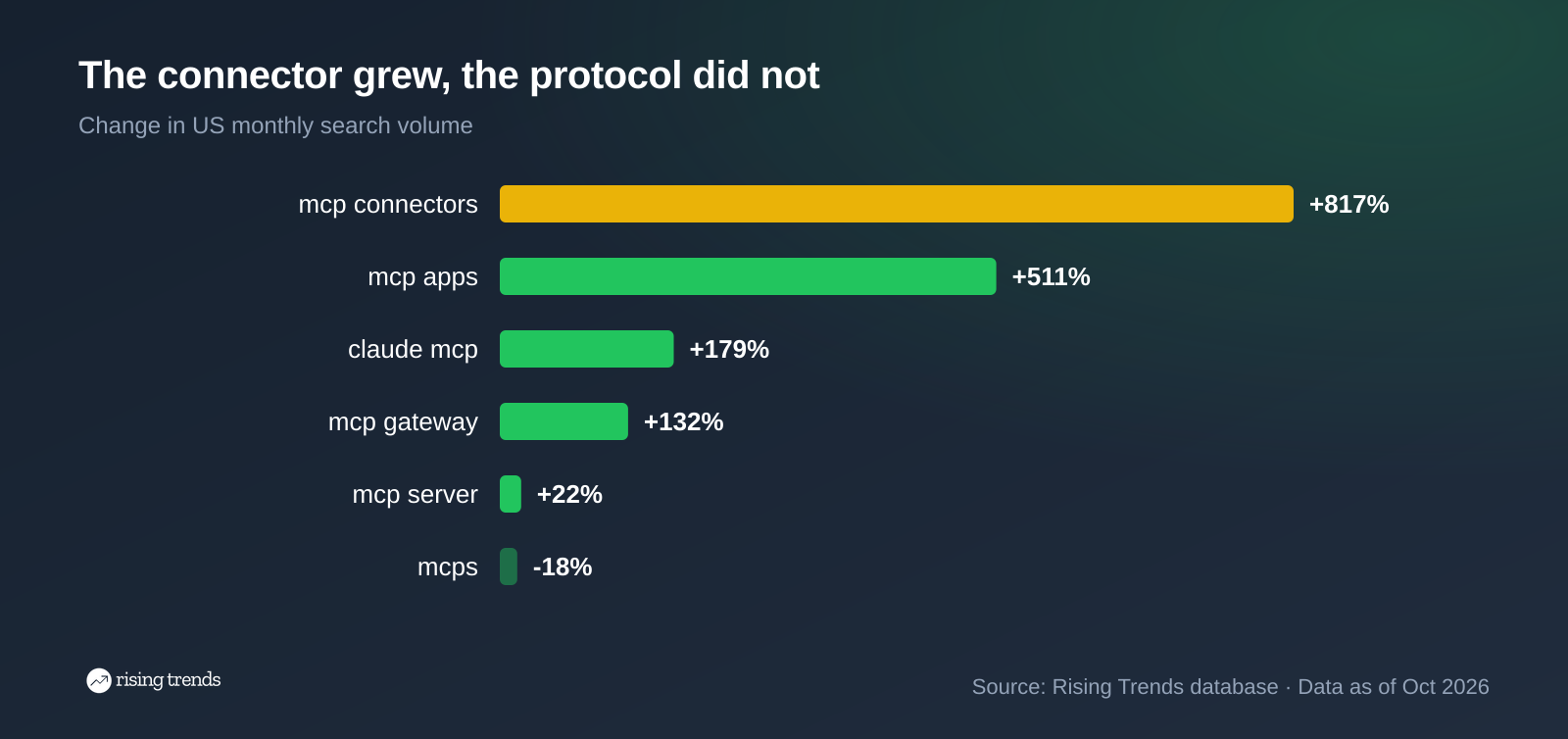
"mcp connectors" grew 817% in a year and "mcp apps" 511%, while "mcps" fell 18%. The people searching for a Google Trends MCP today are mostly not developers planning to host anything. They want a URL they paste once into Claude or ChatGPT. That is why the table below splits hosted from local before anything else, and you can follow these terms yourself on the mcp server trend page or in our roundup of AI trends for 2026.
The 8 options, compared
Every row is a server you can install today. We opened each one's repo, docs or pricing page on November 26, 2026 and recorded what it returns, where the data comes from and what it costs. Anything we could not verify is not here.
| Server | Data it returns | Hosted or local | Free tier | Paid from |
|---|---|---|---|---|
| Rising Trends MCP | Absolute US monthly search volume, 5y history, products, sites, apps | Hosted | No | $97 once, lifetime |
| BigQuery MCP (google_trends dataset) | Top 25 and top 25 rising terms per day, by US metro area | Hosted by Google | 1 TB of queries a month | BigQuery rates after that |
| HasData Google Trends MCP | Google Trends 0-100 index, region map, related queries and topics | Hosted or local | 1,000 credits a month, about 100 calls | $59 a month |
| SerpApi MCP | Google Trends 0-100 index plus every other SerpApi engine | Hosted or self-hosted | 250 searches a month | $25 a month |
| DataForSEO MCP | Google Trends graph, map, topics and queries lists | Hosted or local | No | About $0.009 a request |
| Apify Google Trends Scraper | Interest over time, by city and metro, related queries and topics | Hosted | No | From $3.00 per 1,000 results |
| lhitches/google-trends-mcp | Google Trends 0-100 index, region, trending now | Local (pytrends) | Free, no key | Free |
| jmanek/google-news-trends-mcp | Google News articles and trending terms by country | Local | Free, no key | Free |
1. Rising Trends MCP
The reason it is first is also the reason it is the odd one out: it does not wrap Google Trends. It serves our own database of US monthly search volume, so when you ask Claude how big a term is, the answer is a number of searches rather than a score out of 100. It covers five years of monthly history per term, growth over three months, six months, one year, two years and five years, plus trending Amazon product categories, fast-growing websites, new apps and 70-plus mega trends.
The tools are find_trends, search_trends, get_trend, get_trends, list_mega_trends, get_mega_trend, find_websites, find_apps, find_products, list_categories, and search and fetch for ChatGPT deep research. The one that no Google Trends wrapper can match is find_trends: it answers "what is rising in skincare right now" without you naming a keyword first, because the database already knows what is rising. Every wrapper in this table needs the keyword up front.
Hosted at https://mcp.risingtrends.co/mcp, with OAuth sign-in for Claude and ChatGPT and a Bearer API key for Cursor and Claude Code. Included with Pro, $97 one time for lifetime access (risingtrends.co/pricing, read 26 November 2026). There is no free tier.
What it does not do, plainly: no live 0-100 Google Trends index, no interest by region or city, no related-queries breakout list, no same-day trending-now feed. The data is US only and monthly, not daily or weekly. If you need any of those, one of the servers below is the better answer, and plenty of people run both.
2. BigQuery MCP over the public Google Trends dataset
This is the only genuinely official Google route, and almost nobody mentions it. Google publishes a Trends public dataset in BigQuery, and Google also runs a managed MCP server for BigQuery. Point one at the other and your assistant can query Google Trends data through Google's own infrastructure.
The endpoint is https://bigquery.googleapis.com/mcp over Streamable HTTP, and per the BigQuery MCP docs it is enabled when you enable the BigQuery API. Tools include list_dataset_ids, list_table_ids, get_dataset_info, get_table_info, execute_sql and execute_sql_readonly. You authenticate with Google Cloud credentials or an OAuth client on the https://www.googleapis.com/auth/bigquery scope, and the caller needs the MCP Tool User, BigQuery Job User and BigQuery Data Viewer roles. Google's own Trends analyst agent codelab wires up exactly this.
The catch is the dataset, not the server. bigquery-public-data.google_trends holds the top 25 terms and top 25 rising terms per day, segmented by Nielsen metro area, with a five year backfill and a 30 day partition expiry. If your term is not in a daily top 25, it is not in there. Free inside BigQuery's 1 TB of queries and 10 GB of storage a month, and the sandbox works without a billing account.
3. HasData Google Trends MCP
The most direct hosted answer to the query. One tool, hasdata_google_trends_search_getTrendsData, with a dataType of timeseries, geoMap, relatedTopics or relatedQueries, which is the full set of things the Google Trends web interface shows you. Connect to https://mcp.hasdata.com/mcp?apis=google_trends with an x-api-key header, or install the npm or PyPI package for stdio-only clients.
Each successful call costs 10 credits. The free tier is 1,000 credits a month with no card, which is about 100 calls, and paid plans start at $59 a month for 200,000 credits. MIT licensed, last commit 29 October 2026, so it is actively maintained. The repo documents setup for Claude Code, Claude Desktop, Cursor, Windsurf and VS Code.
4. SerpApi MCP
SerpApi's MCP is not a Trends server, it is a front door to every SerpApi engine, and google_trends is one of them. The Trends engine supports TIMESERIES with up to five queries at once, GEO_MAP, GEO_MAP_0, RELATED_TOPICS and RELATED_QUERIES. Install with npx add-mcp https://mcp.serpapi.com/mcp and an Authorization: Bearer header, or self-host the repo.
The free tier is 250 searches a month. Starter is $25 a month for 1,000 searches and Developer $75 for 5,000 (serpapi.com/pricing, read 26 November 2026). The appeal is breadth: the same key also gets you Google Search, Maps, Shopping and YouTube results in the same conversation, which no Trends-only server offers.
5. DataForSEO MCP
Also a general SEO data server rather than a Trends one. The TypeScript server exposes four tools, docs_index, docs_list_sections, docs_search and api_request, and Google Trends arrives through api_request against the Keywords Data Google Trends Explore endpoint. That returns google_trends_graph, google_trends_map, google_trends_topics_list and google_trends_queries_list.
Run it with npx dataforseo-mcp-server@latest or connect to the hosted server at https://mcp.dataforseo.com/v3/mcp with OAuth. One request covers up to five keywords, and the sample response in DataForSEO's docs shows a cost of $0.009. The tradeoff is indirection: your assistant has to construct a valid API payload rather than call a purpose-built tool, so it works better in Cursor or Claude Code than in a casual chat.
6. Apify Google Trends Scraper, through the Apify MCP
Apify's Google Trends Scraper actor returns the widest slice of the Trends interface: interest over time, interest by subregion, city and metro area, and both top and rising related queries and topics. Connect through https://mcp.apify.com with OAuth or a Bearer token, and enable the actor specifically with ?tools=apify/google-trends-scraper.
Pricing is per result rather than per call, from $3.00 per 1,000 results, which makes it hard to compare directly and easy to overspend if an agent loops. Worth it when you need city-level geography, which most of the others do not give you.
7. lhitches/google-trends-mcp
The pytrends option, and the answer for anyone who searched "pytrends mcp". It reads the public Google Trends endpoints through the unofficial pytrends library, so there is no key and nothing to sign up for. Four tools: interest_over_time for up to five terms, related_queries, interest_by_region and trending_now. MIT licensed. It installs as a Claude Code plugin, with /plugin marketplace add lhitches/claude-seo-plugins followed by /plugin install google-trends-mcp@lhitches, then pip install -r requirements.txt.
The honest caveat is in the repo itself: Google throttles these endpoints. The server retries with backoff and reports the throttling rather than handing your assistant an empty result, which is the right behaviour, but it is still an unofficial endpoint that can stop answering. Fine for exploring, risky for anything scheduled.
8. jmanek/google-news-trends-mcp
The most popular free one by stars, and the one most likely to disappoint if you expect Trends history. It reads Google News and Google Trends RSS and gives you five tools: news by keyword, by location and by topic, top stories, and trending terms for a location. Install with uvx google-news-trends-mcp@latest. Free, MIT, last commit 11 August 2026.
It answers "what is trending in the US right now" well. It cannot answer "how has interest in this term moved over two years", because RSS feeds carry lists, not history.
What the price difference actually looks like
Put the list prices on one axis and the spread is bigger than most people expect.
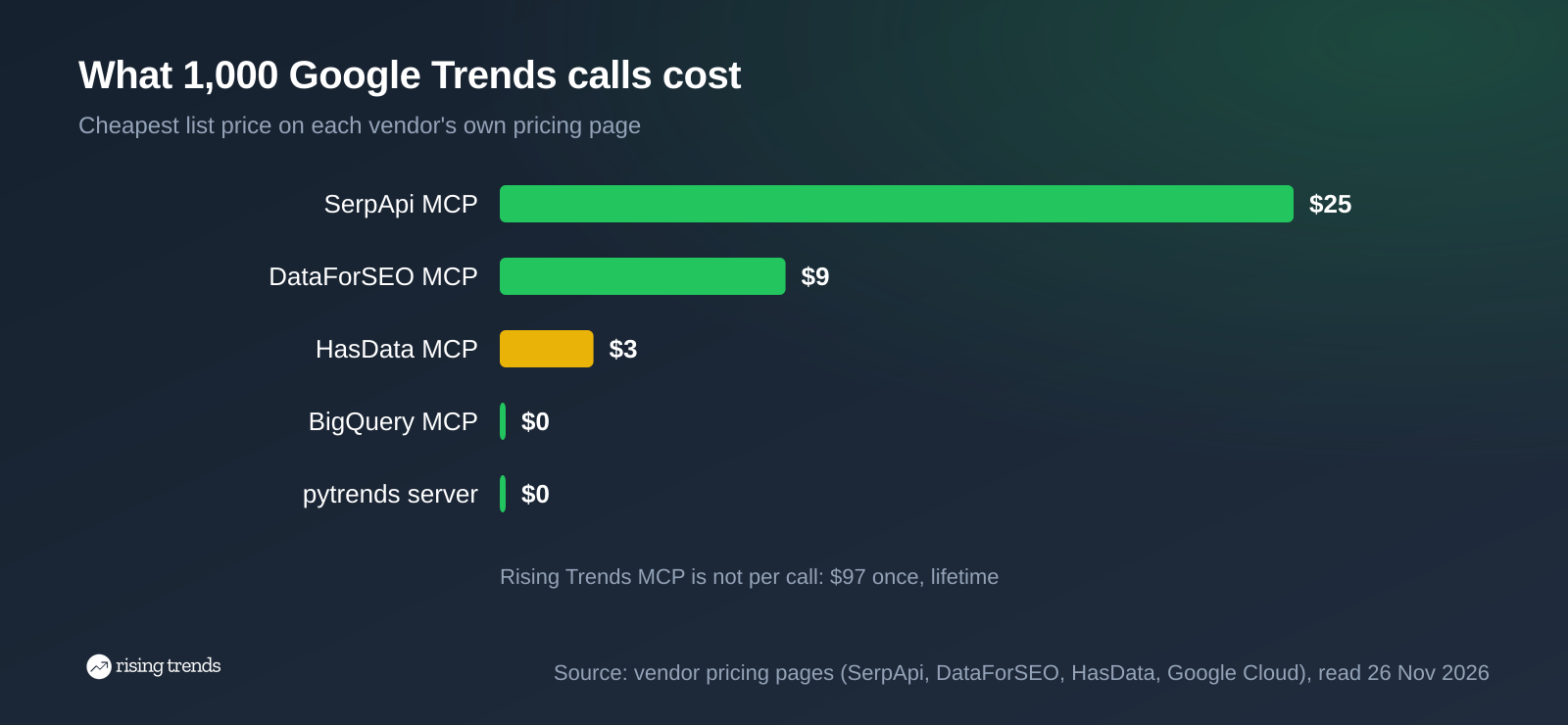
A thousand calls runs $25 on SerpApi's entry plan and about $3 on HasData, a gap of roughly 8x for the same underlying Google Trends data. That matters more than it sounds, because an assistant with a tool will call it four or five times to answer one question. Budget per conversation, not per query. Apify is missing from the chart because it bills per result rather than per call, which is not the same unit.
The thing to check before any of this: index or volume
Nearly every server above returns the Google Trends index, a 0-100 score where 100 is the peak of whatever range you asked for. It is rescaled for every request. That is fine for shape and useless for size.
Take "mcp server" and "claude mcp". On a Google Trends chart with both plotted, you get two curves and a sense that one is bigger. In our database, "mcp server" is at 74,000 US searches a month and "claude mcp" at 8,100, both as of October 2026. One is nine times the other. No index tells you that, and no index tells you whether either is worth building for.
This is the gap the Rising Trends MCP closes. It returns the monthly number, so Claude can say "8,100 searches a month, up 179% in a year" instead of "interest rose from 40 to 87". When the output of the conversation is a plan, a budget or a slide, the difference is whether anyone can act on it. Our longer write-up on the Google Trends API and its alternatives works through the same problem outside of MCP, and the guide to Google Trends alternatives covers the non-API tools.
The index is still the right tool for three jobs: seasonality (does this spike every December), geography (where in the country is this strongest), and same-day news. For all three, HasData, SerpApi or Apify beat us outright, because we do not publish daily data or regional breakdowns at all.
Example conversation
Here is what a question looks like with the Rising Trends connector attached in Claude. Numbers are from our database, data through October 2026.
Example conversation (Rising Trends connector in Claude, data through October 2026)
You
Compare search demand for mcp server, claude mcp, mcp connectors and webmcp. Which is actually growing, and how big is each?
get_trends({ "slugs": ["mcp-server", "claude-mcp", "mcp-connectors", "webmcp"] })
Claude
US monthly searches as of October 2026, with growth over three months and one year:
- "mcp server": 74,000 a month, up 49% over three months and 22% over the year. Pace rapid, high seasonality.
- "webmcp": 9,900 a month, up 313% over three months and 2,438% over the year. Pace exponential, low seasonality.
- "claude mcp": 8,100 a month, up 50% over three months and 179% over the year. Pace exponential, high seasonality.
- "mcp connectors": 6,600 a month, up 83% over three months and 817% over the year. Pace exponential, low seasonality.
The biggest term is the slowest growing. "mcp server" is nine times the size of "claude mcp" but added only 22% in a year, while the three smaller terms all more than doubled. Two of them, "webmcp" and "mcp connectors", carry a low seasonality flag, so the growth is not a calendar effect.
That last paragraph is the part an index cannot produce, because it needs the sizes and the growth rates in the same answer. If you want the longer version of running this weekly, we wrote up how to build a weekly trend report with Claude, and doing market research with Claude covers the prompts for a wider brief.
How to connect one in Claude, ChatGPT or Cursor
Every hosted server here installs the same way, and it takes about a minute.
- Claude: Settings, then Connectors, then Add custom connector. Paste the server URL, sign in and allow access.
- ChatGPT: chatgpt.com/plugins, the plus button, Add custom MCP server. Paste the URL and choose OAuth, then mention the connector by name in a chat.
- Cursor and Claude Code: add the URL and send your API key as a Bearer token in the
Authorizationheader.
Local servers are different: uvx or npx for the ones above, and a Python environment for the pytrends one. If the protocol itself is new to you, the official Model Context Protocol docs explain how clients and servers talk.
Three prompts worth pasting once the connector is live:
- What is rising in [your category] right now? Biggest first, with monthly volume and three-month growth.
- Pull the monthly history for [term]. Was it doing the same thing a year ago, or is this new?
- Compare [term A] and [term B] on monthly searches and one-year growth. Which is the one people actually use?
Which one should you pick?
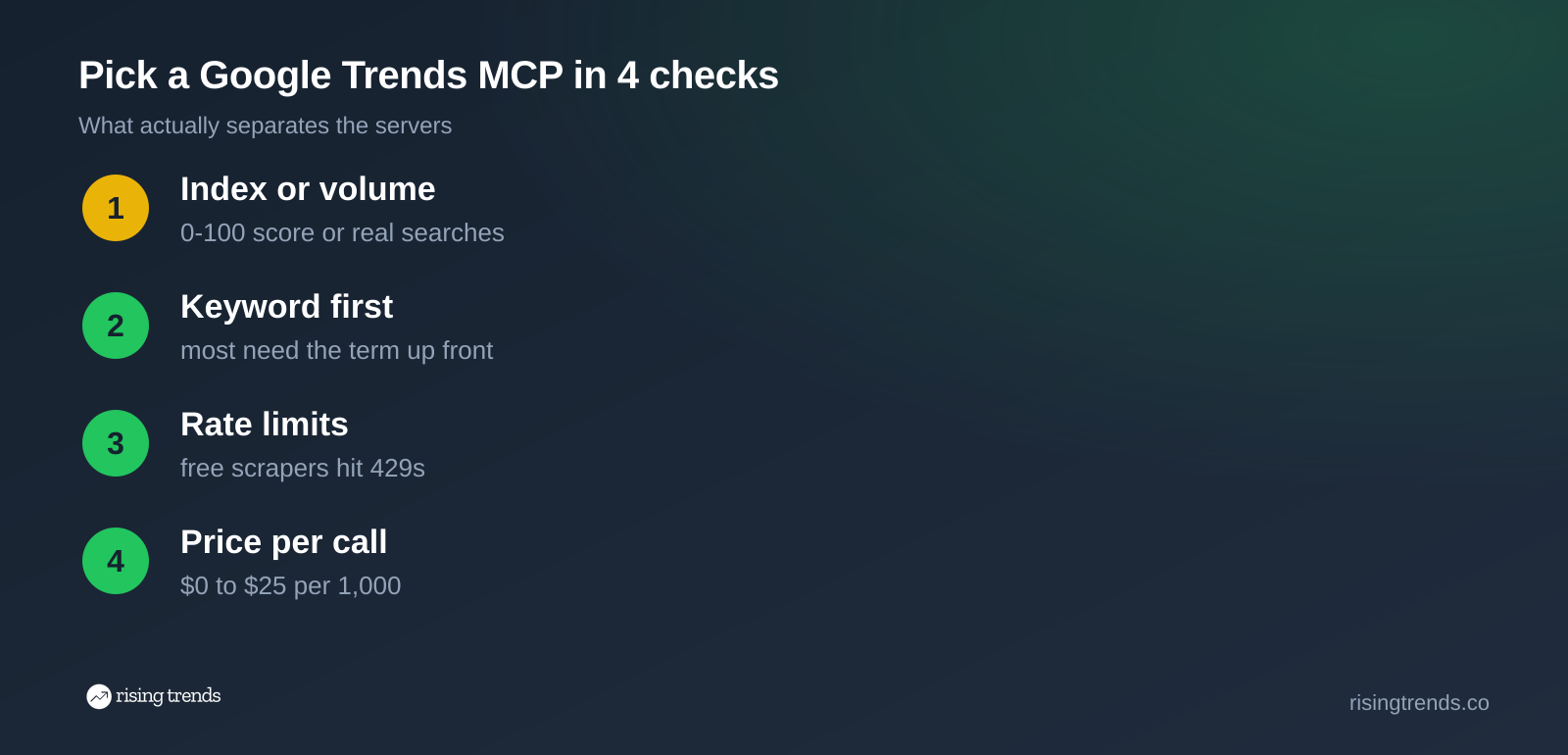
Run those four checks against your actual question and the field narrows fast. If you need a number you can put in a plan, you need volume, not an index. If you do not have the keyword yet, you need a server that can discover. If the job is scheduled, free scrapers will eventually fail you. And if an agent is calling the tool in a loop, the per-call price is the number that bites.
In practice: HasData or SerpApi for the live Google Trends index on a keyword you already have, Apify when you need city-level geography, BigQuery when you want an official Google source and the daily top 25 is enough, the pytrends server for free exploring you do not depend on, and the Rising Trends MCP when the answer has to be in searches per month. For the wider field beyond Google Trends, including social and shopping signals, see our ranking of the best trends MCPs and skills.
Frequently asked questions
Is there an official Google Trends MCP?
No. Google has not shipped one, and there is no public Trends API behind which someone could build an official server. The closest official thing is the BigQuery MCP server pointed at the bigquery-public-data.google_trends dataset, which is Google's own data and Google's own server, but only covers the daily top 25 and top 25 rising terms.
Which Google Trends MCP is free?
Four of them. The pytrends-based server and the Google News Trends server are free with no key at all. HasData gives 1,000 credits a month, about 100 calls. SerpApi gives 250 searches a month. BigQuery is free inside the 1 TB monthly query tier. The free options either rate-limit or return less history.
Does a Google Trends MCP give real search volume?
Almost never. Google Trends publishes a relative 0-100 index, so any server wrapping it returns the index too. To get absolute monthly searches you need a different database, which is what the Rising Trends MCP serves. Our guide to trend analysis explains when the index is enough and when it is not.
Why do free Google Trends MCPs return 429 errors?
Because they call the unofficial endpoints behind the Trends website, which Google rate-limits by IP. A well-behaved server retries with backoff and tells you it was throttled. If a scheduled job depends on the data, use a hosted server with a key instead, or the BigQuery route.
Does Google Analytics have an MCP?
Yes. Google publishes an official Google Analytics MCP server, which is a different product from Trends and reads your own property data rather than public search interest. Google Slides and Google Flow have no official MCP servers; the Workspace side is covered by third-party servers instead.
Can an MCP tell me what is trending without a keyword?
Only some. Every Google Trends wrapper needs the term up front, because that is how the Trends interface works. Trending-now feeds, like the one in the Google News Trends server, give you today's list but no history. For ranked discovery with volume attached, you need a database that already tracks terms, which is the find_trends tool in the Rising Trends MCP and the approach in our piece on finding rising keywords before they peak.
Can I automate this outside a chat window?
Yes, and for anything scheduled you probably should. Every vendor here has a REST API under the MCP layer, including ours: the Trends API returns the same JSON to a cron job or a script that the connector returns to Claude. Chat is for exploring, the API is for reports that run themselves. If keyword research is the end goal, using Google Trends for SEO covers the non-MCP workflow, and the Rising Trends use cases show what the data looks like applied.
Want the numbers without wiring up a server? See how to identify market trends, or browse what is breaking out right now in our trending topics list.
Never miss a trend again
- One trend broken down with the numbers
- Who's making money, and what to build
- A website on the rise
- A breakout app
Join 5,000+ founders