
Using Google Trends for SEO works best as a shape detector, not a volume tool. It tells you whether demand for a query is climbing, seasonal or dying, and which phrasing of an idea people actually type. What it will never tell you is how many people search the term, because the 0-100 line is normalized against total searches by design. So the workflow below runs in two halves: read the shape in Google Trends, then convert that shape into searches per month before anything gets a page.
That second half is the part most guides skip, and it is where keyword research goes wrong. A term can read as a textbook breakout and be worth 590 searches a month. A term can sit dead flat for five years and be worth 673,000.
Key takeaways:
- Google Trends numbers are not searches. Google's own documentation says each point is divided by total searches for its time and place, then scaled 0 to 100 against a topic's proportion of all searches.
- "Breakout" means growth above 5,000%, not size. The term "cortisol meter" was a textbook breakout and peaked at 9,900 monthly US searches in February 2026, then fell to 590 by September 2026 (Rising Trends data).
- A flat line can be the biggest opportunity on the page. "Creatine" has moved 0% in a year and still draws 673,000 monthly US searches as of September 2026.
- Comparing terms side by side hides the small one. Google states that low-volume terms display as 0, so "music ai detector" (170 searches a month) reads as nothing next to "ai detector" (5,000,000).
- Always run five years, not twelve months. A twelve-month window turns an annual seasonal spike into a growth story.
- Check the floor, not the peak. The question is what a term is doing this month, not what it did at the top.
Let's get into it.
What Google Trends actually measures
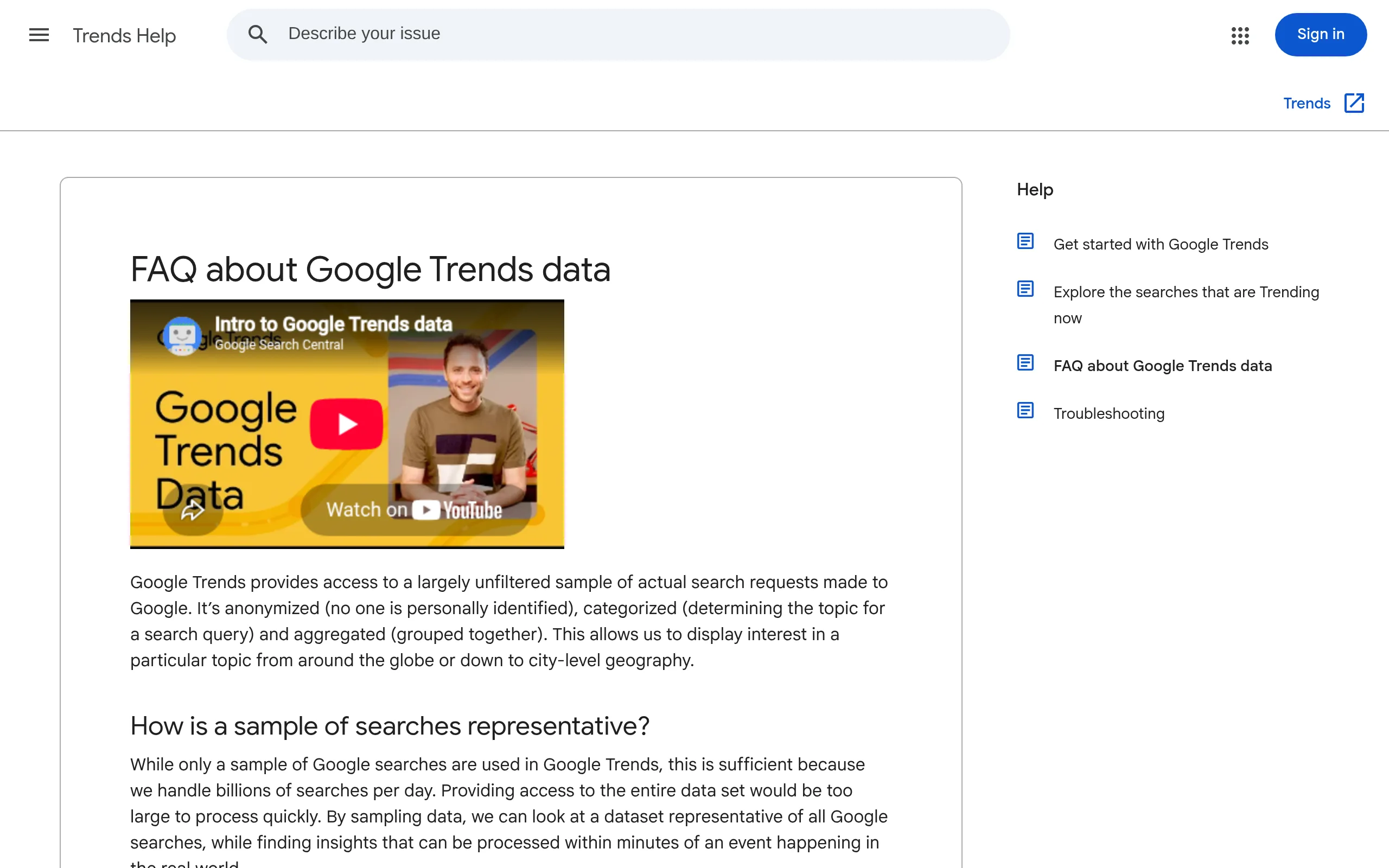
Google Trends is free, it covers Google Search and YouTube, and it reports relative interest rather than counts. The FAQ about Google Trends data spells out the three steps: each data point is divided by the total searches of the geography and time range it represents, the results are scaled on a range of 0 to 100 based on a topic's proportion to all searches, and repeated searches from the same person over a short period are stripped out.
Two lines on that page matter more than anything else you will read about this tool.
The first: "search terms with low volume appear as 0." Your long-tail keyword is not dead, it is below the display threshold.
The second is Google's own advice on the limitation: "If you want to understand the scale of a trend, use relative comparisons to gauge popularity." Google is telling you the tool has no scale and suggesting you borrow one. That is the problem the rest of this guide solves.
Google's own Search Central guidance on Google Trends frames it the same way: Trends is a random sample of aggregated, anonymized and categorized searches, useful for understanding how people find information rather than for counting them.
Step 1. Pick the topic, not just the search term
When you type a query into the Explore box, Google offers two kinds of result: a search term and a topic. A search term counts that exact string. A topic groups the query with its spellings, synonyms and other languages.
Use the topic when you are sizing a subject and deciding whether to build a content hub. Use the search term when you are choosing the exact phrasing of a title or an H1, because that is the string people type.
Getting this backwards is the most common error on this tool. You check a topic, see healthy demand, then write a page targeting a phrase almost nobody uses.
Step 2. Set five years, not twelve months
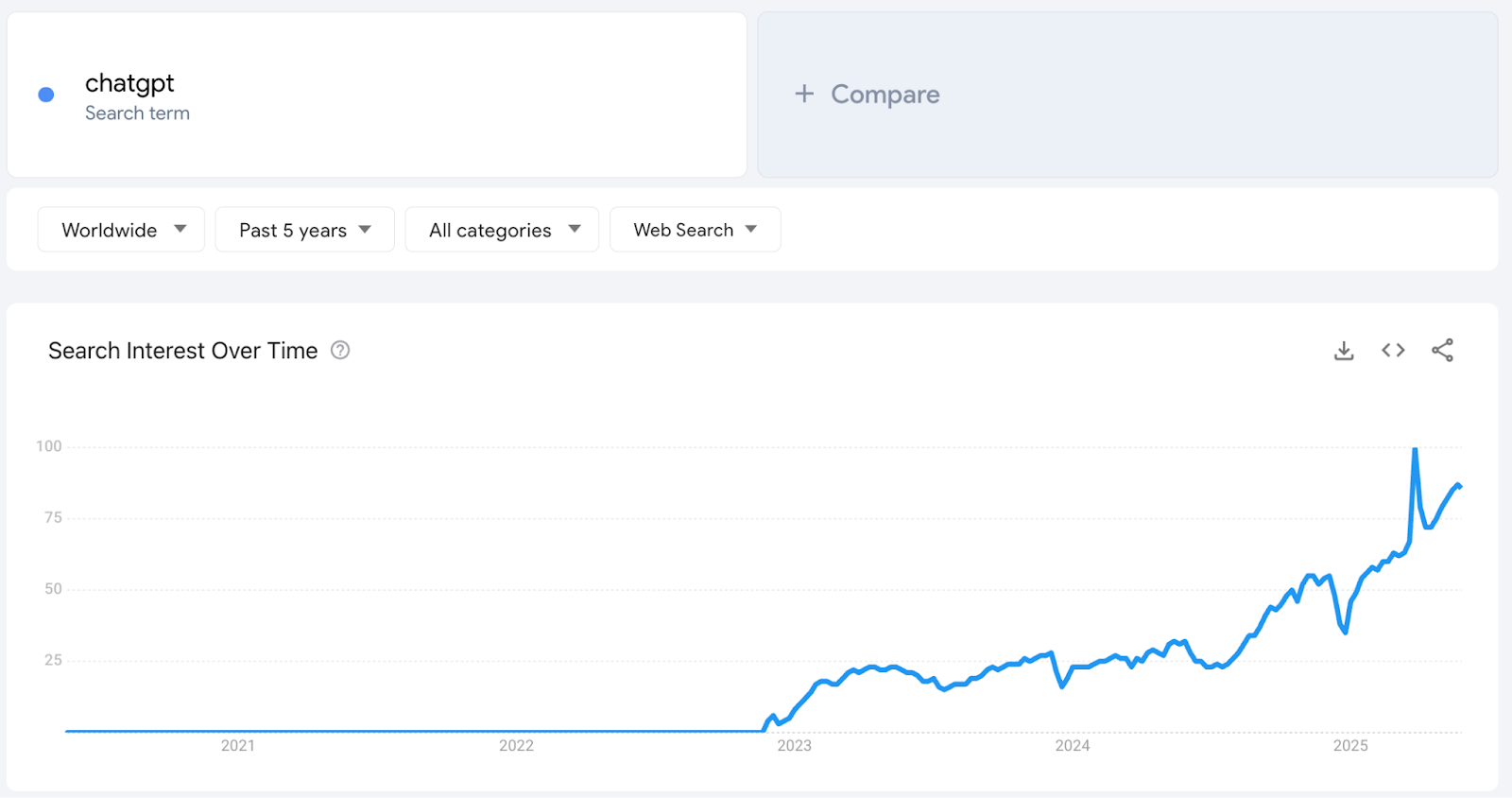
The default window is twelve months, and it is the wrong default for SEO. Over twelve months a term that spikes every January looks like a term that is growing. Over five years you see the same spike four more times and the story changes to seasonality.
Here is the pattern a five-year window is built to show. This is "creatine", pulled from our database.
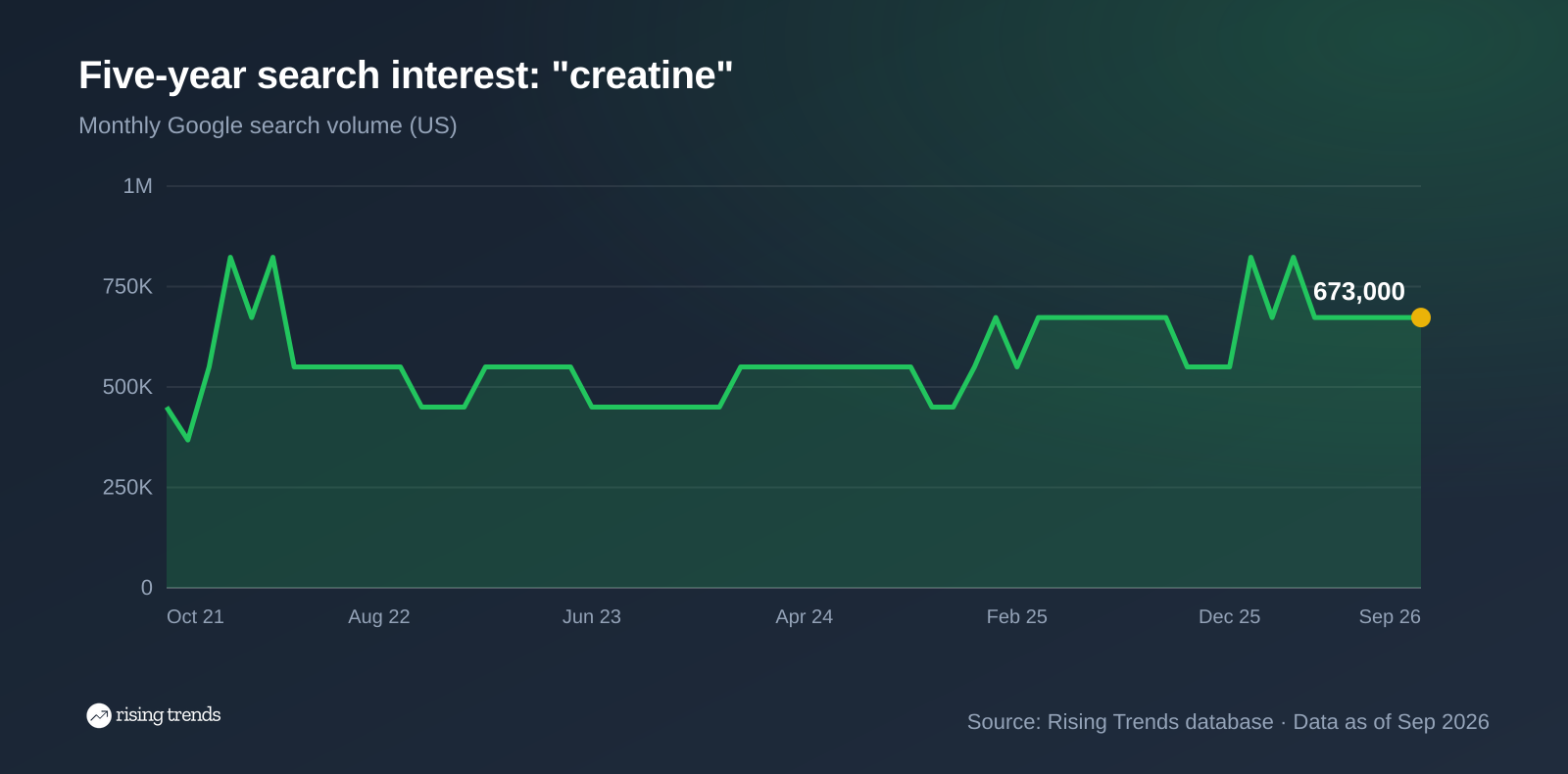
On Google Trends that line looks like nothing is happening, and in relative terms nothing is. Growth is 0% over the last year and 22% over two. The index bounces in a narrow band and an SEO scanning for momentum scrolls past it.
The line is worth 673,000 monthly US searches as of September 2026. Flat at that altitude is not a dead keyword, it is a stable one with a floor you can build a cluster on. The shape told you the term is not growing. Only the volume tells you it is enormous.
This is also why a five-year read beats a twelve-month read for planning. If you want the longer version of this argument, our guide on how to identify market trends covers how to tell a durable shift from a spike.
Step 3. Read rising queries, then check the floor
Scroll to the bottom of any Explore page and you get two lists: top searches and rising searches. Google's help page on related searches in Google Trends defines them precisely. Top searches are terms most frequently searched in the same session as yours. Rising searches rank by growth against the previous period, and when you see "Breakout" instead of a percentage, the term grew by more than 5,000%.
Rising queries are the best free idea source in SEO. They are also the easiest way to waste a month.
Here is a breakout from our database, "cortisol meter", a wearable category that got picked up by health media in early 2026.
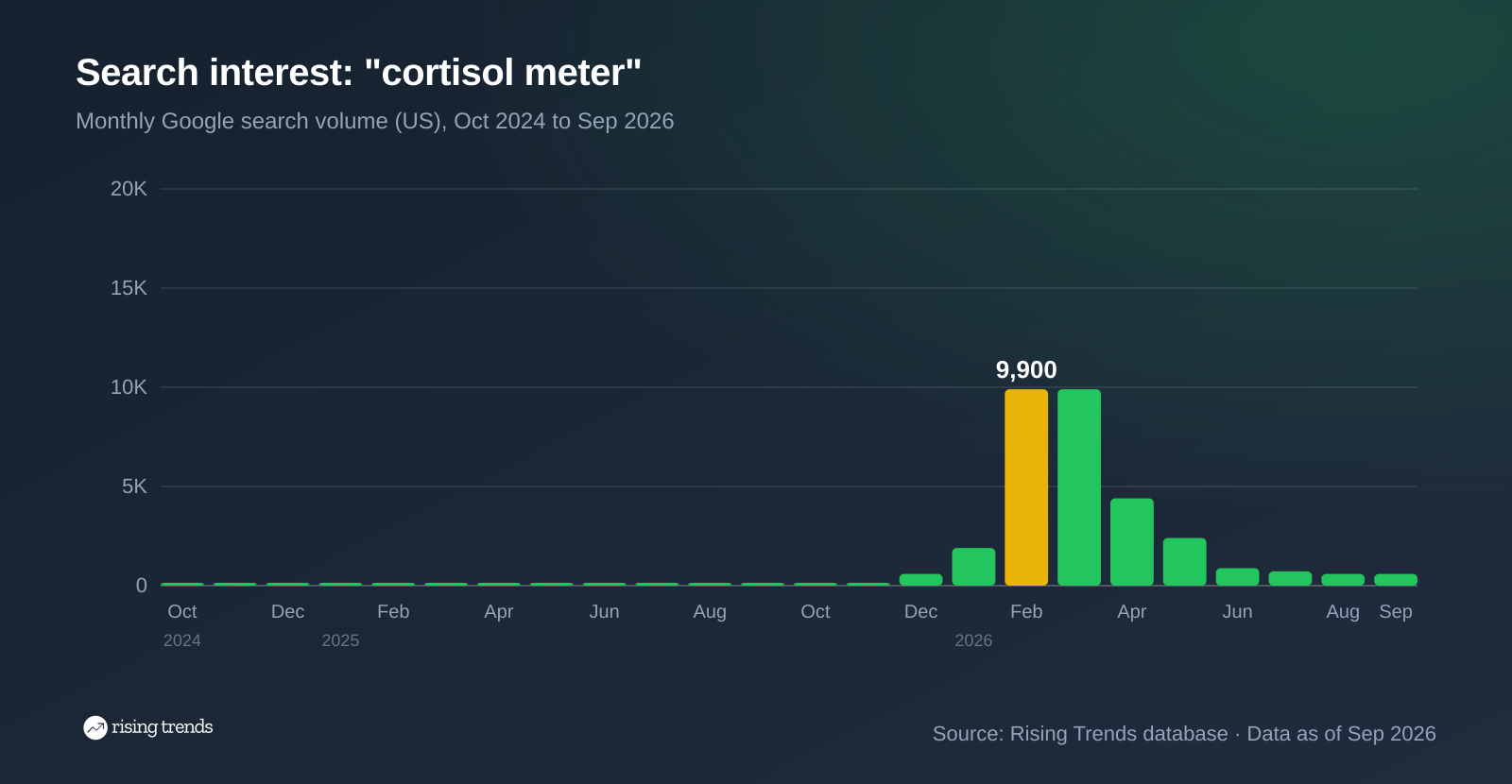
The growth numbers are spectacular: up 743% over a year and 1,080% over two. Any trend tool will flag it. The peak was 9,900 monthly US searches in February 2026, which is a real audience.
By September 2026 the term was searching 590 times a month. The spike lasted about four months and gave most of itself back. A twelve-month Google Trends window still draws a rising line, because February sits inside the window and the baseline underneath it was almost zero.
Compare that to a breakout that held. "Bemotrizinol sunscreen" peaked at 60,500 monthly US searches in June 2026 and had settled at 9,900 by September 2026, up 4,614% year over year. It also decayed, but its floor landed 38 times above where it started. One of these is a page worth writing. The percentages do not tell them apart, and neither does the Trends line. Only the monthly floor does.
So the rule for rising queries: never act on the growth figure alone. Pull the term's monthly volume and look at the most recent month. This is the single check that separates useful breakout research from chasing spikes, and it is exactly what Rising Trends exists to answer. We track absolute US monthly search volume per term, plus 3-month, 1-year and 2-year growth, so a breakout arrives with a size attached instead of a percentage. Google Trends tells you the shape in minutes. The number next to it is what turns the shape into a decision.
Step 4. Compare variants one at a time, never side by side
The compare box takes up to five terms, and it is the feature most likely to mislead you, because every term gets plotted against the largest one in the comparison.
Watch what happens to a real keyword family.
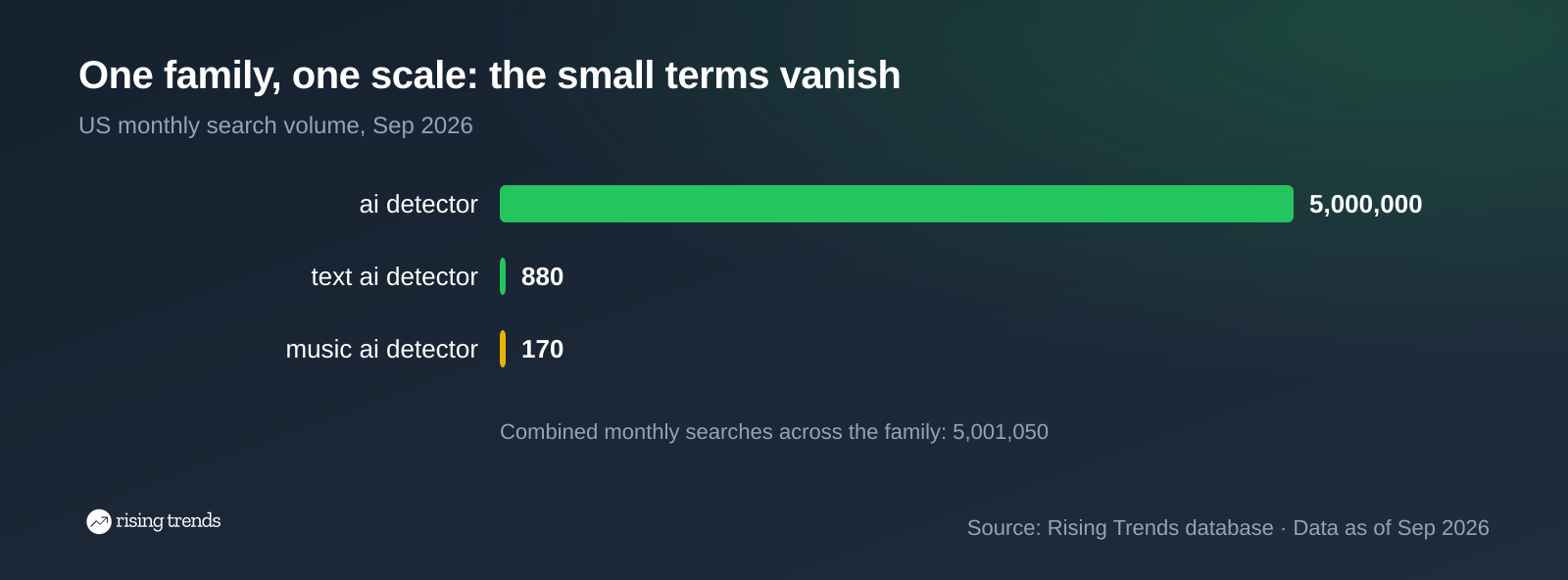
"Ai detector" is a 5,000,000 search a month term. Put "text ai detector" and "music ai detector" next to it and both flatline on the chart, exactly as Google warns: low-volume terms appear as 0.
Yet "music ai detector" is up 1,600% over two years, and "text ai detector" is up 175%. Those are real, winnable long-tail pages with almost no competition. The comparison chart told you they were worthless. It was answering a different question.
The fix is simple. Compare terms only when they are in the same size class. For anything else, check each variant on its own chart, then put the volumes in a table side by side:
| Variant | Monthly US searches (Sep 2026) | 1-year growth |
|---|---|---|
| creatine | 673,000 | 0% |
| creatine monohydrate | 301,000 | +50% |
| creatine gummies | 74,000 | 0% |
Read as a table, the decision is obvious: the head term is the hub, "creatine monohydrate" is the growing child worth its own page, and "creatine gummies" is a product roundup. Read as a Google Trends comparison, you would have seen one tall line and two short ones and learned nothing you could act on.
Step 5. Convert the index into volume before you commit
This is the step that decides whether the previous four were worth running.
You now have a shortlist with shapes attached: this one is growing, this one is seasonal, this one is flat. What you do not have is size, and without size you cannot rank the list or justify the brief. An index point is not a unit. A 60 on one chart and a 60 on another chart are not comparable, because each is scaled to its own term's peak.
There are three honest ways to attach a number:
- Google Keyword Planner, free with any Google Ads account. It returns volume in broad buckets (1K to 10K) unless you are spending, which is enough to size a page and not enough to rank a shortlist.
- A paid SEO suite such as Semrush or Ahrefs, which gives exact estimates alongside difficulty scores and the rest of the SEO toolset.
- Rising Trends, which gives absolute US monthly volume and growth for every tracked term, with the monthly history behind it, so you can see the floor and not just the peak. It is built for the question Google Trends cannot answer, and not for backlinks or rank tracking. If you need site audits and rank tracking, buy an SEO suite.
Whichever you use, apply the same five checks before a keyword earns a page.
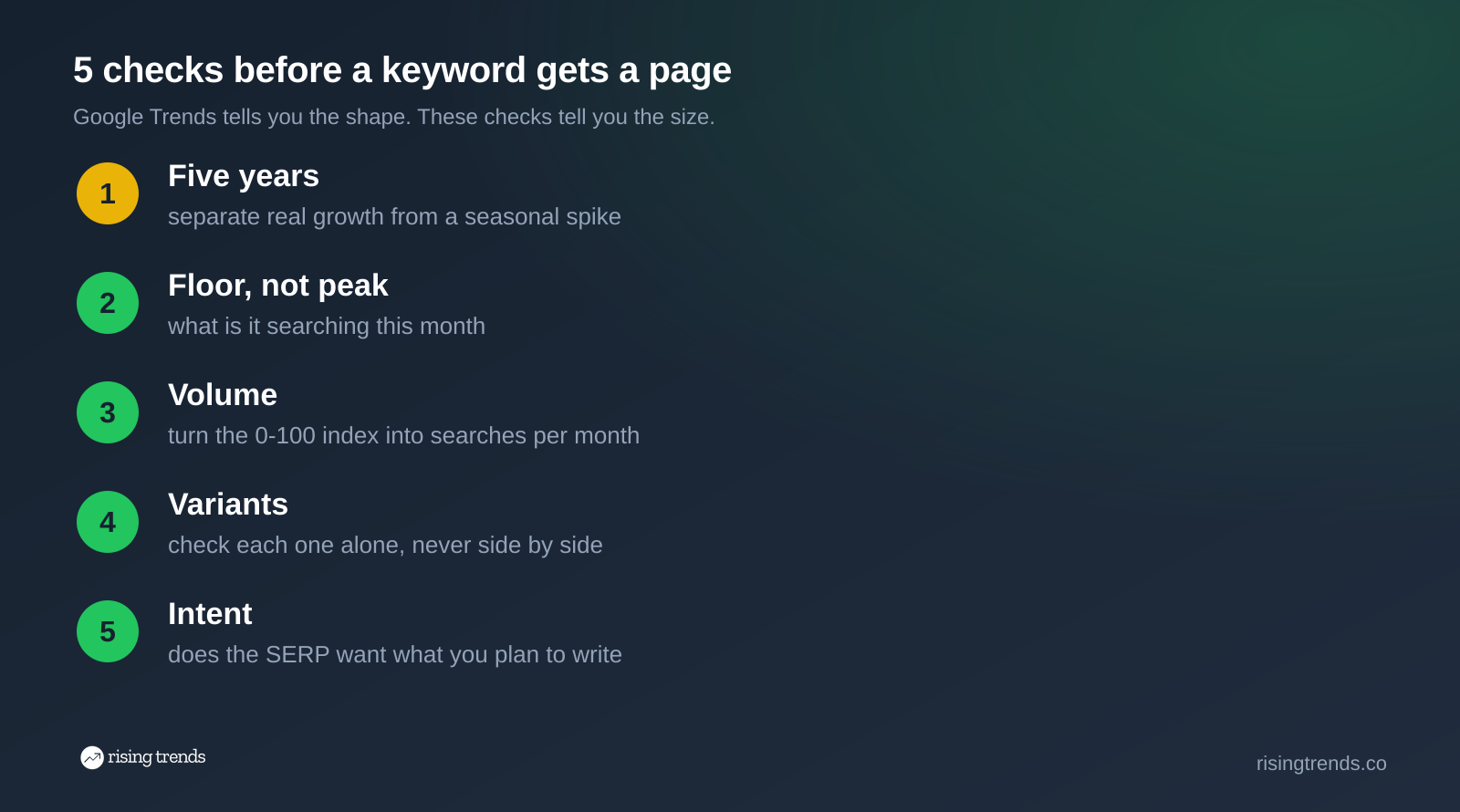
Run those in order and most of a rising-queries list eliminates itself in about ten minutes.
Step 6. Check the region before you write local pages
Interest by region is the one area where Google Trends beats almost everything else, including us. It breaks interest down by country, state, metro and city, and we do not publish city-level data.
Use it to decide whether a term deserves local landing pages, and to find where a national term over-indexes. Two things to remember while you read it: the numbers are still relative, so a state at 100 is the state with the highest share of searches for that term, not the most searches. And a small state can top the list on a handful of queries.
National demand for local intent can be enormous. "Matcha near me" draws 1,000,000 monthly US searches as of September 2026, up 307% over two years, and that is more than the head term "matcha" at 673,000. If you sell a product with a physical location attached, the "near me" variant is often the bigger page. Our guide on how to use Google Trends to find profitable niches walks through sizing a niche this way from the start.
Step 7. Time the publish to the curve
Shape tells you when to ship, which is the one planning question Google Trends answers outright.
- Seasonal term: publish six to eight weeks before the rise begins, so the page is crawled, indexed and has some history before demand arrives.
- Rising term with a floor: publish now. The competition is thin while the term is small, and if the floor holds you own the page when it is not.
- Flat, high-volume term: timing is irrelevant. Quality and internal linking decide this one.
- Decaying spike: skip it, or fold it into an existing page as a section rather than a new URL.
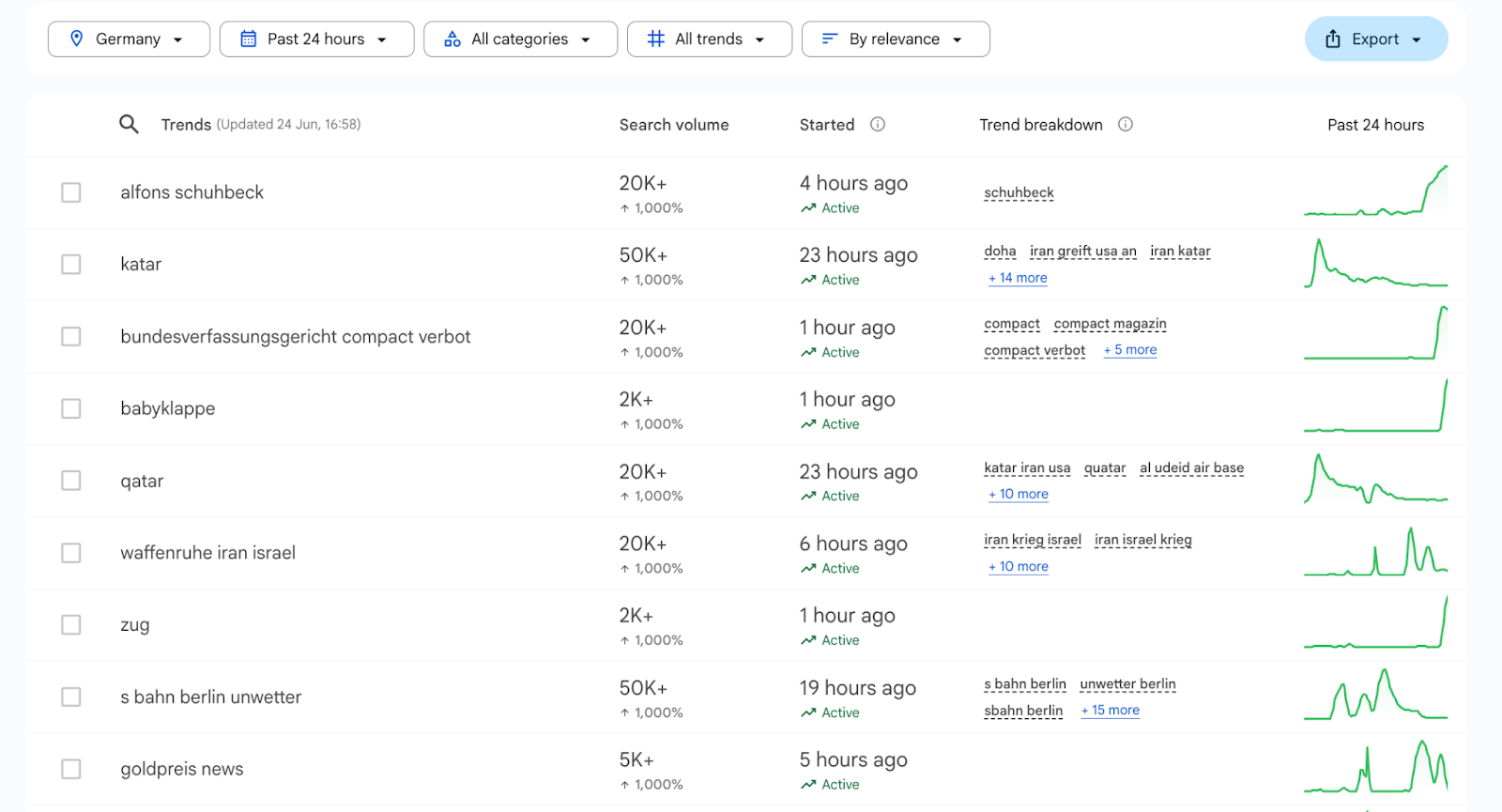
For breaking topics, Google Trends is the better tool and it is not close. Trending Now updates through the day, while our database is monthly. If your strategy is news-led, start there. If your strategy is evergreen pages that compound, the monthly floor matters more than the hourly spike. Our guide to trend forecasting covers how to tell the two apart before you commit a quarter to either.
Automating the weekly scan
Running steps 1 through 5 by hand is fine for ten keywords. It falls apart at a hundred, and a content team repeats this scan every week.
Google has no official public Trends API, which is why most teams end up on the unofficial Python libraries and their rate limits. We cover the options and the trade-offs in our guide to the Google Trends API.
For the sizing half of the job, the Rising Trends API collapses the scan into one request. Filter the database by volume and growth and get back everything that clears your bar:
curl -H "Authorization: Bearer rt_live_..." \
  "https://www.risingtrends.co/api/v1/trends?category=nutrition&min_search_volume=5000&min_growth_pct=100&sort=search_volume&order=desc"
That returns every nutrition term above 5,000 monthly searches that has at least doubled, sorted by size. The weekly keyword scan becomes a cron job, and you spend your time on briefs instead of on charts.
Three traps worth naming
The breakout with no floor. A percentage with no denominator is not a number. "Cortisol meter" grew 743% in a year into 590 searches a month. Always ask what it grew to.
The flat line you skipped. Momentum is not the only signal. "Creatine" at 0% growth and 673,000 searches a month beats almost every breakout you will find this quarter.
The comparison that zeroed your keyword. Terms plotted against a much larger term render as 0. That is the chart's scaling, not the market's verdict.
Frequently asked questions
Is Google Trends free or paid?
It is completely free and there is no paid tier. You do not need a Google account to use the Explore page, though signing in lets you save searches and subscribe to email alerts for a term or topic.
How does Google Trends work?
It takes a sample of real Google and YouTube searches, strips out identifying information, groups them by topic, then normalizes them. Each point is divided by the total searches in that place and time, and the result is scaled 0 to 100 against the term's own peak. That is why the chart shows relative interest and never a count.
Is Google Trends accurate for keyword research?
It is accurate for what it reports, which is direction and relative share. It is not a volume tool and it was never meant to be one. Use it to find and shape keyword ideas, then size them somewhere else before you build a content plan around them.
Can I use Google Keyword Planner for free?
Yes. Keyword Planner comes with a free Google Ads account and you do not need an active campaign. The catch is that accounts with no ad spend see volume in wide ranges, such as 1K to 10K, rather than a specific figure.
How do I see search trends for a specific term?
Go to trends.google.com, type the term, and set your country and a five-year range. Read the interest over time chart for shape, then scroll down for interest by region and the top and rising related queries. Then look the term's monthly volume up in a volume tool before you act on it.
What is the 80/20 rule in SEO?
The idea that a small share of your pages drives most of your organic traffic, so your effort belongs on the pages and keywords that can actually move the number. Keyword research is how you find that 20%, and it is the reason size matters more than growth percentage when you build the shortlist.
Is Google Trends still useful in 2026?
Yes, for the job it does. AI Overviews and answer engines changed what a click is worth, but they did not change what people type, and Trends still reports that faster than anything free. What has changed is that guessing at volume costs more than it used to, because there are fewer clicks to go around. Pair the shape with a real number. Our guide on using Google Trends for market research covers the non-SEO uses, and our SEO use cases walk through niche selection with the same two-step method.
Want the volume number next to every rising term instead of a 0-100 line? Read our guide on how to identify market trends, or browse what is breaking out right now in our trending topics list.
Never miss a trend again
- One trend broken down with the numbers
- Who's making money, and what to build
- A website on the rise
- A breakout app
Join 5,000+ founders