
The best MCP for content creators depends on which part of your week is slow. For deciding what to make next, connect Rising Trends MCP, which returns real US monthly search volume per topic instead of a 0 to 100 index. For competitor and transcript research use the YouTube Data MCP, for editing use Descript, for voice use ElevenLabs, for thumbnails use Canva, for scheduling and numbers use Buffer, and for TikTok or Instagram data use Apify. Connect two or three, not eight.
Key takeaways:
- Most creator MCP roundups skip the expensive decision. They cover editing, captions and posting. None connects a server that can tell you whether a topic is growing, so none answers what to film.
- Only one server here returns an absolute number. Rising Trends MCP gave 74,000 US searches for "everygen ai" in October 2026, up from 5,400 the month before. Google Trends wrappers would show that as a shape, not a figure.
- Six of the eight are free to start. Buffer, Canva and Notion include MCP access on their free plans, the YouTube Data MCP reads transcripts with no API key, ElevenLabs gives 10,000 credits a month and Apify gives $5 of usage.
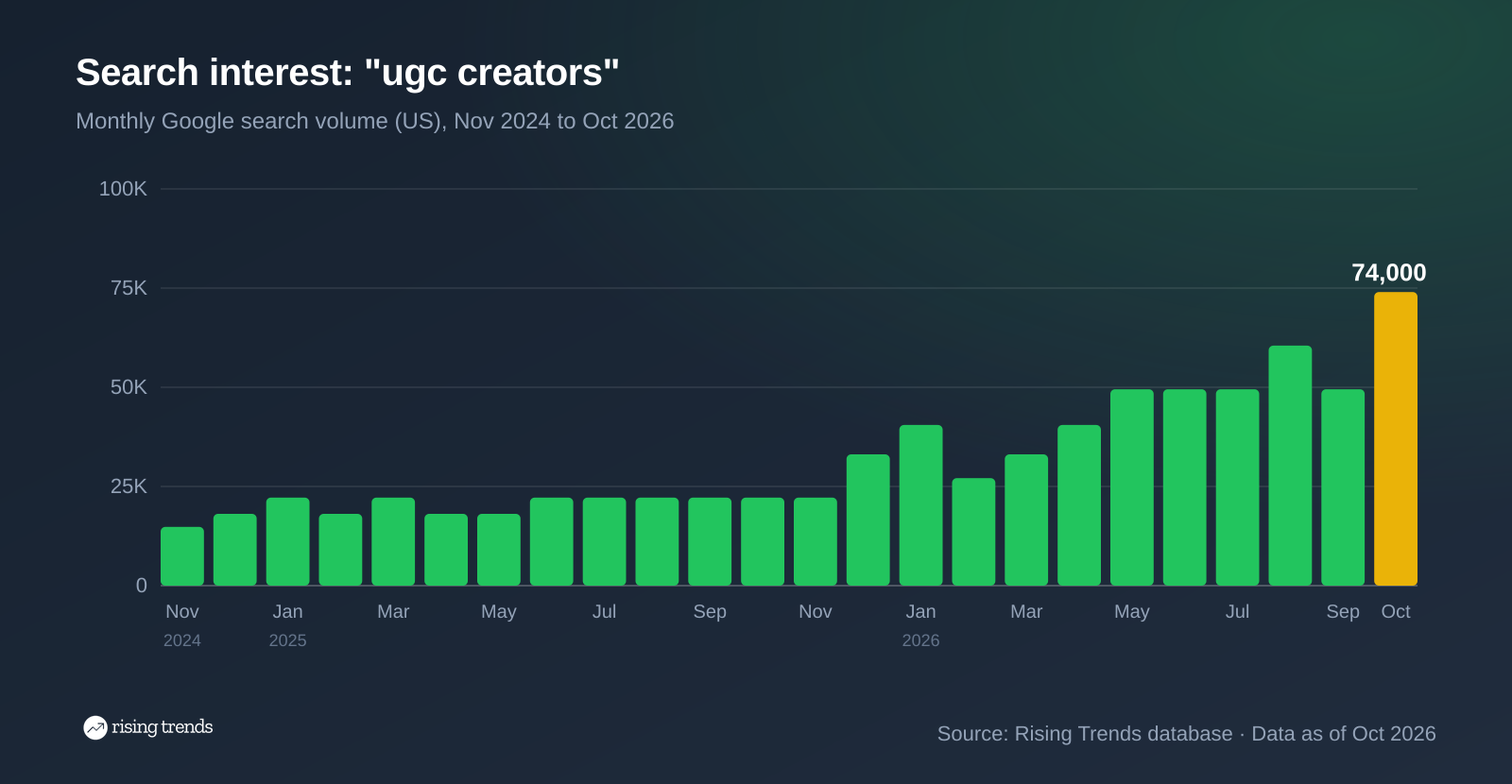
- The creator economy is the demand story, not just a vibe. "ugc creators" hit 74,000 monthly US searches in October 2026, up 233% in a year, and "faceless channel" is up 556% over the same period.
- Setup is a URL, not a build. Six of these ship a hosted endpoint you paste into Claude or ChatGPT once and sign in to. Budget ten minutes.
- Connect three at most. Each server adds tool definitions the model must choose between, and accuracy drops as that list grows.
Let's get into it.
What an MCP actually changes for a creator
An MCP server is a connector that lets Claude or ChatGPT call someone else's system directly, mid-conversation. Without one, you paste things in and copy things out. With one, the assistant reads your Descript drive, your Buffer queue or a search database and acts on what it finds.
For creators that collapses the handoffs between "what should this video be about" and "it is scheduled for Tuesday".
The demand for the connectors themselves is new and steep. In our database, "mcp server" went from 20 US searches a month in October 2018 to 74,000 in October 2026, and "mcp connectors" is up 817% over the past year.
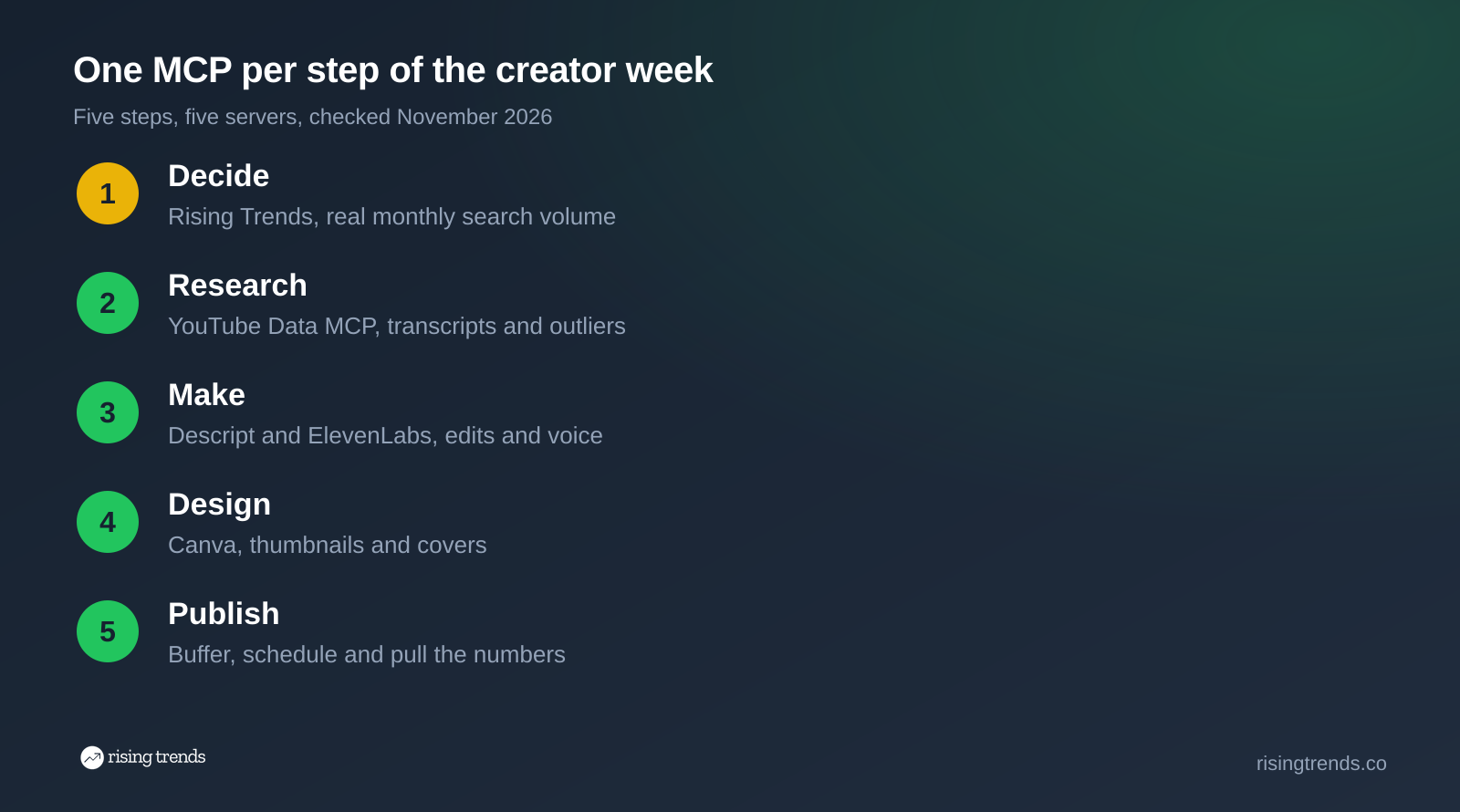
That map is how this list is ordered: by the step, not by the brand. Work down it and your shortlist picks itself.
How we picked and checked these
Every server below was checked on 22 November 2026 against its own docs, help centre, repo or package registry. Nothing here is copied from another roundup, which matters because most creator MCP lists ranking today still quote prices that have changed.
- Real and installable. It has a hosted endpoint or a published package you can connect today.
- Maintained. Last release inside twelve months. Anything older was dropped.
- It does a creator job. Not a developer utility that happens to fetch a URL.
- Priced in public. Where a feature needs a paid plan, that is said plainly.
Package freshness read from npm on the day: Apify 0.22.0 (20 Nov 2026), Notion 2.6.1 (29 Oct 2026), YouTube Data MCP 1.1.16 (1 Nov 2026).
Three servers on other lists did not make it: Blotato gates everything behind a $29 a month plan with no public tool list, the PyPI "canva-mcp" package is a community project while Canva ships an official connector, and the TikTok-only servers we found had no verifiable maintenance history.
The 8 best MCPs for content creators, compared
| Server | The step it covers | Data or system | Free tier | Paid from |
|---|---|---|---|---|
| Rising Trends | What to make next | US search volume, products, websites, apps | No | $97 one time |
| YouTube Data MCP | Competitor and transcript research | YouTube Data API v3 | Yes, transcripts need no key | Free, open source |
| Descript | Editing, captions, filler words | Your Descript drive | Free plan to start | $16 a month |
| ElevenLabs | Voiceover, dubbing, transcription | ElevenLabs voices | 10,000 credits monthly | $5 a month |
| Buffer | Scheduling and post analytics | Your connected channels | Yes, on every plan | $5 a month per channel |
| Canva | Thumbnails, covers, carousels | Your Canva designs | Yes, Canva Free included | Autofill needs a paid plan |
| Notion | The content calendar | Your workspace | Yes, every plan | Included |
| Apify | TikTok and Instagram data | Marketplace of hosted scrapers | $5 of usage monthly | $19 a month |
1. Rising Trends MCP
The step: deciding what to make, before you spend two days making it.
This is the server the other creator roundups leave out, and it covers the only decision on the list that cannot be undone in the edit. Every tracked term carries absolute US monthly search volume with five years of history, growth over three months to five years, and the date it entered the database. That last field tells you how early the signal was there, which is the difference between catching a topic and arriving late.
Connect it at the Rising Trends MCP page, which is one URL pasted into Claude or ChatGPT.
The tools are find_trends, search_trends, get_trend, get_trends, list_mega_trends, get_mega_trend, find_products for Amazon categories with price and monthly sales, find_websites, find_apps and list_categories. Searching is free and does not count against your quota.
Two matter most for a creator. search_trends folds aliases together, so it finds the phrasing your audience actually types. get_trend returns five years of monthly numbers, which is how you tell a topic that is climbing from one that peaked in March.
Price: Pro, $97 once for lifetime access, including the Claude and ChatGPT connector, the REST API, trend tracking and 20 trend analysis credits a month. There is no free tier, and that is the honest trade: everything else here lets you try before you pay.
What it does not do: it holds no video data. No view counts, no channel statistics, no comments, no TikTok sounds, no live Google Trends index. For channel research use the YouTube Data MCP below, and for social data use Apify.
Example conversation (Rising Trends MCP in Claude, data through October 2026)
You
I cover AI tools on YouTube. What is rising right now that I should film this week?
find_trends({ "category": "Artificial Intelligence", "timeframe": "1y", "min_volume": 20000, "sort": "growth", "limit": 5 })
Claude
Five fastest-growing Artificial Intelligence terms with at least 20,000 US monthly searches, October 2026:
- "everygen ai": 74,000 a month, from zero in August 2026. Added to the database 15 November 2026.
- "anthropic s1": 90,500 a month, up 15,239% over three months. Added 8 November 2026.
- "rtx spark laptop": 74,000 a month, up 1,021% over three months. Added 18 October 2026.
- "speech to text": 40,500 a month, up 82% over three months.
- "googlebook laptops": 27,100 a month, up 12,805% over three months.
"everygen ai" is the cleanest gap: 0 searches through August, 5,400 in September, 74,000 in October. Almost nobody has published on it yet.
You
I was going to do a Claude Cowork video instead. Check that one first.
get_trend({ "name_or_slug": "claude cowork" })
Claude
"claude cowork" peaked at 301,000 US searches a month in February and March 2026 and has fallen every month since: 246,000 in April, 165,000 in May, 110,000 in July, 74,000 in August, 60,500 in September and 49,500 in October 2026. That is down 55% over the last three months.
It is still a large term, but the curve is heading down and the existing videos are nine months old with the views already banked. "everygen ai" is ten weeks old with almost nothing published against it.
Both answers came from two tool calls against the database. That is the point of a demand server: the assistant quotes real monthly figures instead of guessing from training data that ended months ago. The same five-year history is what our walkthrough of finding rising keywords before they peak uses to separate a climb from a fad.
2. YouTube Data MCP
The step: finding out what is already working on YouTube, and reading it without watching it.
The @kirbah/mcp-youtube server wraps the YouTube Data API and trims the responses so they do not eat your context window. Nine tools, including getTranscripts, getChannelTopVideos, getVideoComments and findConsistentOutlierChannels, which surfaces channels that repeatedly beat their subscriber count in a niche. The full list is in the YouTube Data MCP repo.
Transcripts are the sleeper feature. Ask for a competitor's top five videos as text and you read the structure of an hour of content in two minutes.
Setup: npx -y @kirbah/mcp-youtube. MIT licensed, version 1.1.16 published 1 November 2026. Transcript fetching works with no key at all; everything else needs a free YouTube Data API v3 key, which comes with a default quota of 10,000 units a day.
Price: free and open source.
Weakness: it tells you what already ranks on YouTube, a record of the past. Pair it with a demand server or you will keep making the video that worked last quarter.
3. Descript MCP
The step: the edit, including the parts nobody enjoys.
Descript's connector lets an assistant import media, transcribe it, then run Underlord edits on the project: Studio Sound, remove filler words, add captions. It can also search your drive, organise projects into folders, publish to a Descript web link and export the transcript as SRT, markdown, text, HTML or RTF. The capability list is in Descript's MCP help page.
Auth is your Descript login, scoped to one drive you pick during sign-in. The server URL appears under Settings, then Descript MCP, in the app.
Price: per Descript's pricing page, free to start with paid plans from $16 a month. The MCP is not billed separately, but imports consume your plan's media minutes and Underlord edits consume AI credits, so an afternoon of chatty editing is not free.
Weakness: it works on your Descript drive, not a timeline in another editor. If you cut in Premiere or Resolve, this does nothing for you.
4. ElevenLabs MCP
The step: voiceover, dubbing and clean transcription.
Useful for faceless channels, dubbing into a second language and tidying audio you recorded badly. Tools named in the ElevenLabs MCP repo include speech_to_text, speech_to_speech, isolate_audio and video_to_music.
Worth knowing before you install anything: the local server in that repo is archived and read-only. ElevenLabs now points users at its hosted endpoint, https://api.elevenlabs.io/v1/mcp, which uses OAuth, so there is nothing to install.
Price: the ElevenLabs pricing page lists a Free plan at $0 with 10,000 credits a month covering text to speech, speech to text, sound effects and music, then Starter at $5 a month billed annually, which adds the commercial licence, instant voice cloning and Dubbing Studio. The free plan has no commercial licence, which matters the moment your video is monetised.
Weakness: synthetic narration is a format signal, not a neutral choice. Part of the audience hears it and leaves, and the backlash has its own search curve, which we cover in the no AI slop trend.
5. Buffer MCP
The step: scheduling, and finding out what actually landed.
Buffer's server is at https://mcp.buffer.com/mcp over OAuth, and the Buffer MCP documentation lists the tools: list_channels, list_posts, create_post, edit_post, delete_post, get_aggregated_post_metrics, list_ideas, create_idea and more, plus five post-template tools and a review_weekly_posts prompt.
That metrics tool is the one to care about. It returns totals and averages for any range up to 365 days, filtered by channel or tag, so you can ask what performed well last month and get numbers rather than a vibe.
Price: MCP access is on every plan including Free, which covers three channels, ten scheduled posts per channel and 100 ideas. Buffer's pricing page puts Essentials at $5 a month per channel and Team at $10. On the Free plan, metrics queries must start inside the last 31 days.
Weakness: it posts to the channels Buffer supports, and metrics refresh once a day. It is a scheduler with an API, not a real-time analytics suite.
6. Canva MCP
The step: thumbnails, covers and carousels, without leaving the chat.
Canva's AI Connector lets an assistant search your designs, generate content, create and edit designs and export files. Canva's help centre confirms it is available on all Canva accounts, Free and Education included, and that Autofill, which fills a Brand Template with your own data to batch designs, needs a paid plan and is not on Free or Pro Lite.
Autofill is worth the upgrade for anyone running a series: one brand template plus a list of episode titles gives you a season of thumbnails in one prompt.
Price: included with your Canva plan. AI-powered actions draw down your monthly Canva AI allowance, and if you are on a team, an admin can switch the connector off entirely under Controls and Permissions.
Weakness: it is a design tool with an assistant attached, not a thumbnail strategist. It makes the image you describe. Whether it gets clicked is your problem.
7. Notion MCP
The step: the calendar, so the plan survives the week.
The piece that keeps everything else from scattering. Point it at your content database and the assistant can search the workspace, create and edit pages and query your views, so a research session ends as a row in next month's calendar rather than a paragraph you lose. The endpoint is https://mcp.notion.com/mcp over Streamable HTTP, documented in Notion's MCP setup guide.
Notion MCP works on every plan, with limits by tier: notion-search works everywhere, saved-view queries work on all plans, and unlimited SQL queries need Business or Enterprise with Notion AI. MCP tokens are Business and Enterprise only, and guests cannot connect. One date to diarise: the legacy SSE endpoint retires on 23 February 2027.
Price: included in your Notion plan. The npm package @notionhq/notion-mcp-server is at 2.6.1, MIT licensed.
Weakness: it is only as good as your workspace. Point it at a messy one and you get messy answers faster than before.
8. Apify MCP
The step: TikTok, Instagram and anything else that needs scraping.
There is no official TikTok MCP, and the unofficial ones we checked had no maintenance history worth trusting. Apify is the honest route: a marketplace of hosted scrapers covering TikTok, Instagram, YouTube and most other platforms, which the assistant can search and run from the chat. Use it for hook research across a hashtag or pulling comments in bulk.
Setup: npx @apify/actors-mcp-server, or the hosted endpoint. MIT licensed, version 0.22.0 published 20 November 2026, the most recently updated server on this list.
Price: per Apify's pricing page, the Free plan gives $5 of platform usage a month with no card, then Starter $19, Scale $199 and Business $999, each plus pay as you go at $0.2 per compute unit.
Weakness: actor quality varies, because anyone can publish one. Check an actor's run history first. And scraped captions and comments are evidence of what people say, never a fact about the world.
Which three should you connect?
Connecting all eight is the common mistake. Three is the practical ceiling for one working session.
- YouTube, growth focused: Rising Trends for the topic, YouTube Data MCP for the competition, Canva for the thumbnail.
- Short form at volume: Rising Trends for what is rising, Apify for hook research, Buffer for the queue.
- Podcast or long form: Descript for the edit, ElevenLabs for the audio fixes, Notion for the calendar.
- Newsletters and blogs: Rising Trends for demand, Notion for the pipeline, Buffer for distribution.
Rising Trends appears in three of those four because every other server answers a question about work you have already decided to do. The Trends MCP and API return absolute monthly volume per term, where every search-based alternative returns a relative index, and that is the number you need before the camera comes out. If you would rather see the same data without connecting anything, our use-case walkthroughs cover the browsable version, and the AI trends category page lists what is climbing in the biggest creator niche right now.
The underlying demand is not subtle. "ugc creators" went from 14,800 US monthly searches in November 2024 to 74,000 in October 2026.
And it is the whole category moving, not one term. Over the past year "mcp connectors" is up 817%, "faceless channel" 556%, "ugc creators" 233%, "ai newsletter" 123% and "ai thumbnails" 81%.
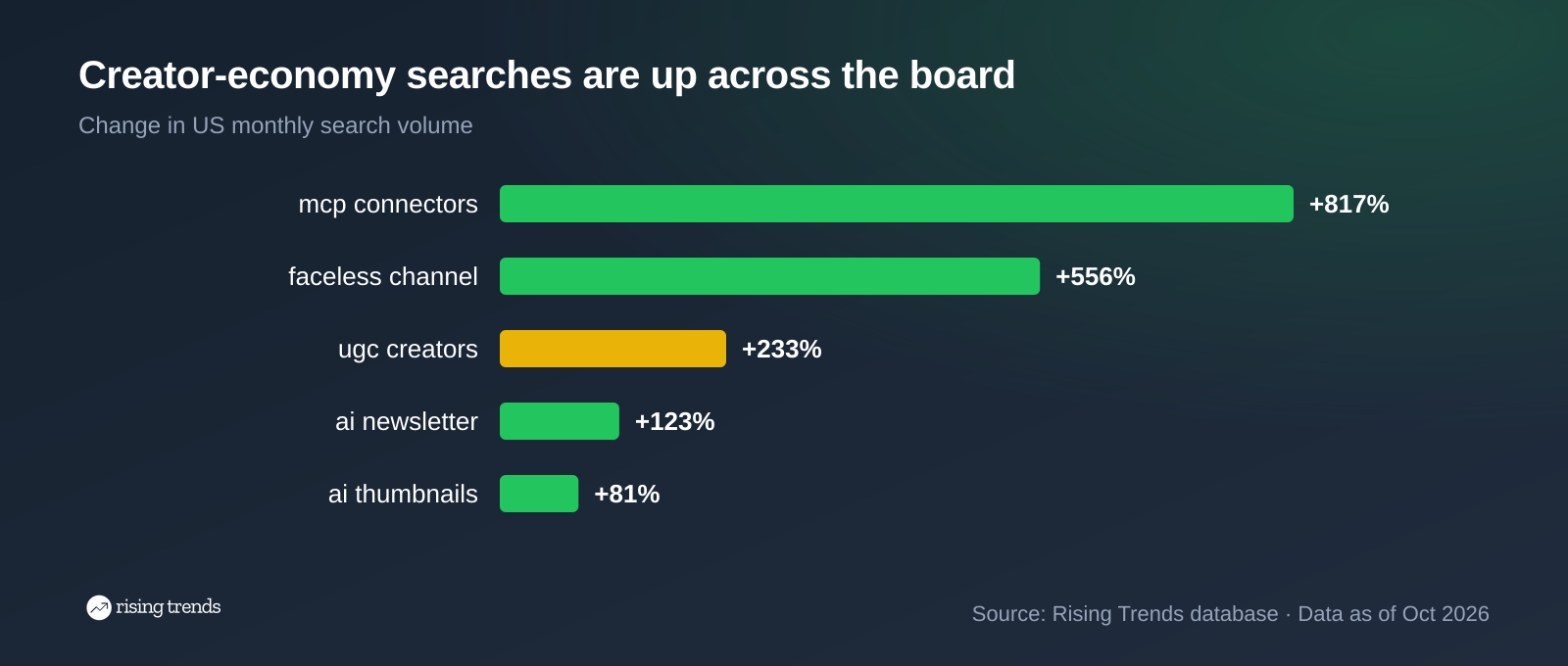
More people are competing for the same attention every quarter, which is why the topic decision is worth more than the editing speed.
How to connect one in Claude or ChatGPT
The hosted servers all follow the same three steps.
- In Claude: open Settings, go to Connectors, add a custom connector and paste the server URL.
- In ChatGPT: open the connectors page, add a custom MCP server, paste the URL and choose OAuth.
- Sign in and allow access, then ask your first question in plain words. The assistant picks the tool.
For Claude Code or Cursor, create an API key in the service and send it as an Authorization: Bearer header alongside the URL. Setup for Rising Trends specifically is on the MCP page linked above, and the broader list of trend-data servers is in our roundup of the best trends MCPs and skills.
Copy-paste prompts
- "Using Rising Trends, find the fastest-growing topics in my niche over the last year with at least 10,000 US monthly searches, and tell me when each one entered the database."
- "Check this topic before I film it: give me five years of monthly search volume and tell me whether it peaked, and in which month."
- "Find three channels in this niche that consistently beat their subscriber count, pull the transcripts of their top videos, then tell me which angles nobody has covered."
What an MCP will not do for you
Worth saying plainly, because the roundups skip it.
It will not make the thing good. The assistant removes filler words and schedules the post. Taste, pacing and whether the first eight seconds hold are still yours.
It will not tell you why a topic is rising. Search volume says how many people looked for something, not what they wanted. That reading is still a human job, and the method is in our guide to trend analysis.
And it will not fix a bad source. An assistant that scrapes a wrong number repeats it confidently. Check anything that drives a decision.
FAQ
Which AI tool is best for content ideas?
The one connected to real demand data rather than a text generator. An idea generator produces plausible titles with no evidence anyone is searching for them. A demand server tells you a topic went from 5,400 to 74,000 monthly searches in one month, which is a reason to film. Rising Trends MCP is the one here that returns that number; the rest help you make the thing once the decision is made.
What AI tools do content creators use?
In practice it is a short stack: something for ideas, something for the edit, something for design and something for posting. The eight servers above map onto that, and most working creators connect three. Our guide to doing market research with Claude shows how the research half runs in one conversation.
Is there a YouTube MCP?
Yes, several, but all are community wrappers of the official YouTube Data API rather than a first-party Google server. @kirbah/mcp-youtube is the one we would install today: MIT licensed, published this month, nine tools, and transcripts work without an API key.
Is there a TikTok MCP?
Not an official one. TikTok publishes no MCP server, and the third-party ones we checked had no verifiable maintenance history. The reliable route is Apify, which runs maintained TikTok scrapers on a hosted platform and returns clean data to the chat.
Which MCPs for creators are free?
Buffer, Canva and Notion include MCP access on their free plans. The YouTube Data MCP is open source and reads transcripts with no key. ElevenLabs gives 10,000 credits a month and Apify $5 of usage. Descript needs a paid plan for serious use, and Rising Trends is paid only.
Can an MCP post to my channels for me?
Buffer can, through your connected channels, and Descript can publish to a web link. Nothing else here posts anywhere. Grant posting permission deliberately: a connector that can publish can also publish something you did not mean.
How many servers should I connect at once?
Two or three. Every connected server adds tool definitions to the model's context, and the assistant gets worse at choosing between them as that list grows. Connect what this week needs, then swap rather than stack. The same rule holds for the research stacks in our roundups of the best MCP servers for market research and the best MCPs for finding business ideas.
Do I need to code to use these?
No. Six of the eight are a URL you paste into a settings screen and sign in to. Only the YouTube Data MCP and Apify involve a command, and both are a single npx line. If you are building a product research stack too, the best ecommerce MCP servers list follows the same pattern.
Want the data without the chat? Read our guide on how to identify market trends, or browse what is breaking out right now in our trending topics list.
Never miss a trend again
- One trend broken down with the numbers
- Who's making money, and what to build
- A website on the rise
- A breakout app
Join 5,000+ founders